The Assessment.
Every campaign starts with a character sheet. Yours is an 11-step assessment — and it is the single highest-leverage thing you’ll do in the app. Your entire training, nutrition and recovery plan is forged from these answers.
Answer like your plan depends on it (it does)
- Your goal & event — a HYROX race, a marathon, a strength block, general hybrid gains. A date makes the periodization real.
- Your schedule — real training days and session lengths. An honest 4 days beats a fantasy 6.
- Your equipment — full gym, garage rack, two dumbbells and hope. The plan only prescribes what you actually have.
- Injuries & niggles — every one you list gets programmed around, not through.
- Food preferences — allergies, dislikes, diet style. The meal plan should feed you, not fight you.
- Your numbers — height, weight, lifts you know. Better inputs, sharper targets.
Rule of the scroll: the more detail you write, the better your plan gets. One-word answers summon a generic plan. Full sentences summon a coach who already knows you.
Your plan is built.
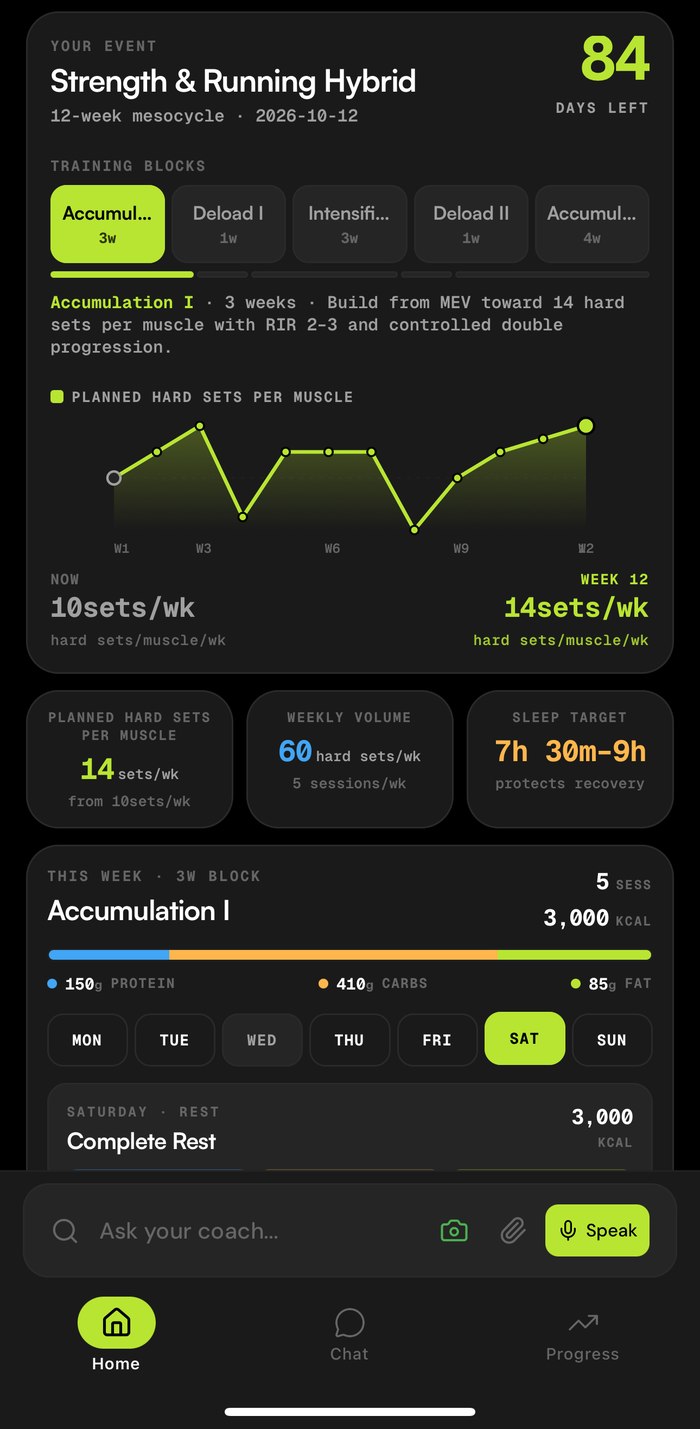
Submit the assessment and the forge lights up — about a minute later you have a periodized training plan (real blocks: accumulation, deload, intensification, taper), a meal plan with calorie and macro targets, and recovery targets like a sleep window that protects your progress.
This isn’t a template. It’s built from your answers — and it keeps rebuilding. Slept badly? Today adapts. Crushed yesterday’s session? Today adapts. You just show up.
Home. Chat. Progress.
The whole app lives behind three tabs. Learn what each realm is for and you’ll never feel lost.
🏠 Home
Your day at a glance: calories and macros vs targets, today’s planned workouts and meals, your timeline of everything logged, and the two big buttons — Log Movement and Log Food.
💬 Chat
Coach OG, 24/7. Ask anything, log anything, plan anything. It remembers your injuries, your schedule and your weird food preferences — answers are grounded in your data.
📈 Progress
The war room. Readiness, training load, sleep, HRV, macro adherence — plus AI coach reviews (twice a day) that tell you what the numbers actually mean.
Secret passage: the “Ask your coach…” bar at the bottom of Home is Chat in disguise — with camera, attachment and voice buttons built in. You’re never more than one tap from your coach.
Log in seconds, five ways.
Logging is where most fitness apps go to die. OnlyGains gives you five spells — pick whichever is fastest in the moment:
📸 Snap your plate
Tap the camera, photograph your food, done — full calories, macros and micros read straight from the photo.
💬 Just say it
Type “had a pistachio gelato” or “did 5x5 squats at 80kg” into chat. Logged, with sensible estimates, in one message.
🎙️ Voice log
Hit Speak and narrate your meal or workout while you walk out of the gym. Hands-free logging is real.
⌚ Do nothing
Connect a wearable and your watch reports workouts, sleep and recovery automatically. The laziest spell is often the best one.
🏋️ Or run the full session
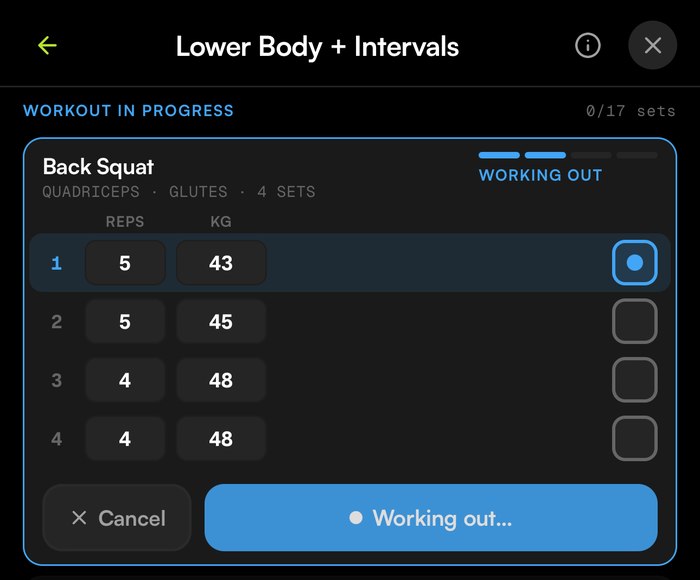
Open today’s workout and hit Start workout — tick off sets as you lift, with reps, weight and rest tracked per set. Every exercise page has an AI-generated how-to guide and a video tutorial, so “what’s a Romanian deadlift?” never stalls a session. Want something custom? Design with AI builds a workout from a sentence.
Connect your wearable.
A wearable is your familiar — it whispers to your coach while you sleep. Connect one in Profile → Wearables (or during onboarding) and readiness, sleep, HRV, strain and every recorded workout flow in on their own.
From your phone
- Apple Health — Apple Watch, rings, or any HealthKit app (iPhone)
- Google Health Connect — any Android-connected tracker
Or link a service
- Strava — one-tap OAuth connect
- Oura, WHOOP, Fitbit — rolling out; watch the wearables screen
One-ring rule: connect one wearable — your cleanest data source. One good ally beats three arguing ones (and no duplicate workouts).
Reminders that actually help.
Allow notifications and OnlyGains sends ravens — nudges for the day’s workout, meal and protein reminders when your log is running quiet, and a ping when your coach review lands.
Want a specific one? Just ask in chat — “remind me to take creatine at 8am” — and it’s set. Reminders live where the coaching lives, so you never dig through settings menus.
Read your progress.
The Progress tab turns your logs and wearable data into a story you can actually read. Check it once a day — morning is best — and let the numbers steer the week.
The daily six
Ready · Load · Sleep · HRV · RHR · Zone-2 minutes — your last-7-days vitals, pulled from your wearable. Green is go; dips explain themselves.
Load ↔ Recovery
Every session lands on a quadrant: Productive, Maintaining, Overreaching, Strained. Live in Productive; visit Overreaching on purpose, not by accident.
Fitness vs Fatigue
The classic two-line chart. Fatigue spikes fast, fitness climbs slow — when the gap closes and form turns optimal, that’s when you push.
Nutrition truth-telling
Macro split vs targets, protein consistency day-by-day, calories in vs out. Fourteen days of logs beats any feeling about “eating pretty well lately.”
Twice a day, the AI coach reviews all of it and writes you the summary: what’s working, what needs attention, what changed in your plan and why.
Summon a human coach.
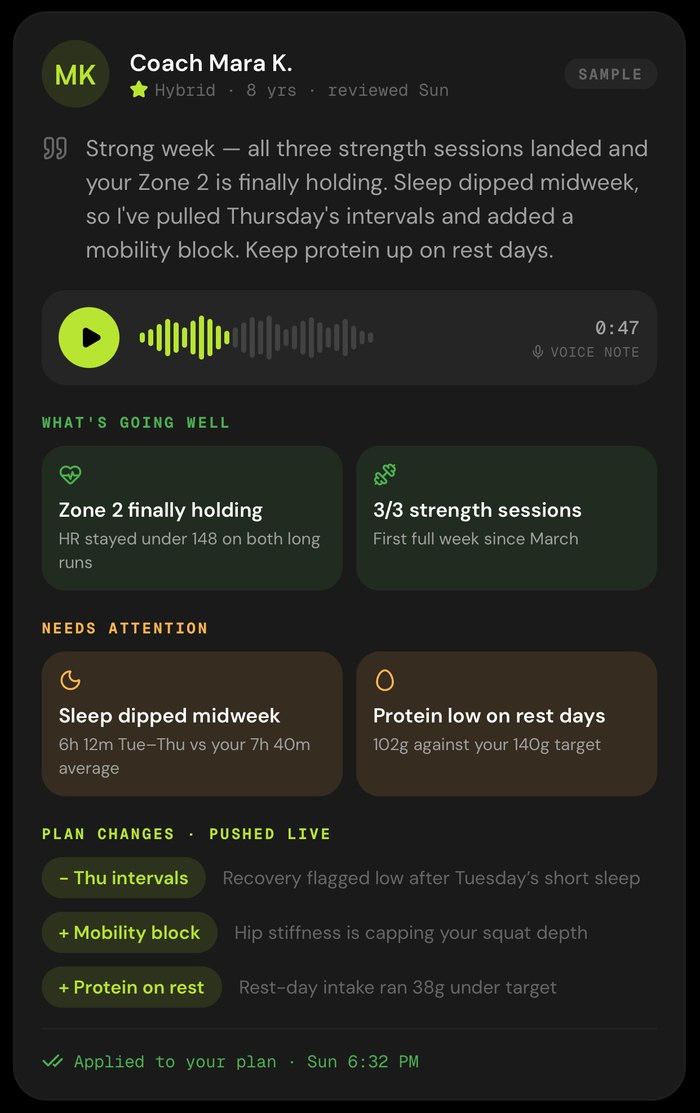
OnlyGains is never AI alone — humans stay in the loop. And for $30/mo you can add an accredited human coach who reviews your week, every week.
A real coach reads your logs and wearable data, records you a voice note, calls out what’s going well and what needs attention — and pushes plan changes straight into your app. You’ll see exactly what changed and why.
End of the map. Start of the campaign.
That’s the whole world: answer deeply, log lazily, sync your wearable, read the map room, and let the plan keep rewriting itself around your life. So long — and thanks for all the gains.